PLC programming in Structured Text
PLC programming you can see: Structured Text on a 3D training station
Write IEC 61131-3 Structured Text, log in to a simulated PLC and watch your program drive a training station, a conveyor, a storage tank, a sliding gate, a lift and a pedestrian crossing — build your own visualisation screen and see live values next to every line of code.
Learn it in order
Each topic has a step-by-step lesson with programs that run on the training station, and generated exercises with new values every time:
- The PLC and the scan cycle — 5 steps
- Boolean logic: AND, OR, NOT, XOR — 4 steps
- IF statements and latching — 4 steps
- Edges: R_TRIG and F_TRIG — 4 steps
- Timers: TON, TOF and TP — 4 steps
- Counters: CTU, CTD and CTUD — 3 steps
- Numbers: INT, REAL, TIME and overflow — 4 steps
- CASE and state machines — 3 steps
- Visualisation: moving objects with X and Y — 4 steps
- Arrays and FOR loops — 3 steps
- Debugging: Write, Force, Flow control and breakpoints — 3 steps
Work like on a real PLC
Build, Login, Run
Compile with clear error messages (line and hint), download to the simulated PLC and run it in a fixed scan cycle (1–100 ms).
Online mode
Live values next to every variable in the code, a Watch table, Write and Force of prepared values, breakpoints and flow control.
Scope and I/O
Record every variable cycle by cycle, link variables to the inputs and outputs (AT %I*, AT %Q*) and see the hardware state.
Standard blocks
TON, TOF, TP, R_TRIG, F_TRIG, CTU, CTD, CTUD, SR and RS, with timing diagrams drawn by the simulator itself.
3D training station
A PLC with DI/DO/AI/AO modules on a DIN rail, terminal blocks, cable duct and an operator panel with switches, push buttons, lamps, potentiometers and displays.
Machines
A belt conveyor with light barrier, a storage tank with an analogue level transmitter and float switch, a sliding gate with limit switches and photo-eye, a three-floor lift and a pedestrian crossing, all driven by your program.
Visualisation editor
Build an operator screen next to your code: buttons (tap or toggle), lamps, texts with %d values, bars, sliders and rectangles with absolute movement, linked to your variables and operated online.
19 graded challenges
Each challenge is tested like an instructor would: the inputs are operated automatically on a separate copy of the PLC and the outputs are measured cycle by cycle. Any program that behaves correctly passes.
- Lamp with ON and OFF push buttons (Basic) — A lamp is controlled by two push buttons: one switches it on, the other switches it off. This is the classic latching (self-holding) circuit, done in software
- Counter with ±400 limits (Basic) — Two buttons increase and decrease an integer. Eight lamps show the value as a bar graph
- Count presses and make a 1 s pulse (Basic) — A button increments a counter once per press and, at the same time, lights a lamp for exactly one second. The starting code is the class version and already works
- TON, TOF and TP: the whiteboard diagram (Basic) — Recreate the timing diagram drawn on the whiteboard: the same signal In1 feeds three different timers, and each one drives a lamp. Run the program, open the Scope and swi…
- Running light with 8 lamps (Intermediate) — When the button is pressed, the eight lamps light one at a time, from DO1 to DO8, each for lamp_time . It is a chain: when one pulse ends (falling edge), the next one sta…
- Flasher (oscillator) (Intermediate) — While the switch IN1 is on, lamp Q1 flashes: 500 ms on, 500 ms off. This is an oscillator built from two timers that trigger each other
- Move a block on the visualisation (Basic) — In a PLC visualisation a rectangle can move using Relative movement : the variables MAIN.X and MAIN.Y give its position in pixels. Four buttons (Tap) control the movement
- Jumping with gravity (Intermediate) — A small "game": the block walks sideways with LEFT / RIGHT and rises while JUMP is held. When you let go, gravity pulls it back to the floor
- Binary number and periodic sampling (Intermediate) — Switches IN4…IN8 form a 5-bit binary number (IN8 is the least significant bit). The PLC works out the value TEMP and compares it with limits, as if it were a temperature
- Position on a 3×3 grid (CASE) (Intermediate) — A cursor moves on a 3×3 grid of squares numbered 1 to 9, driven by four buttons. The grid "wraps round": leaving one side brings you back in on the opposite side
- Potentiometer, display and bar graph (analogue) (Intermediate) — The workbench has analogue inputs and outputs: potentiometer AI1 gives an integer from 0 to 32767 (0…10 V), and display AO1 shows the voltage that matches an output integ…
- Car park counter (CTUD) (Intermediate) — A small car park has 5 spaces. A sensor at the entrance and another at the exit see each car
- Storage tank: level control with hysteresis (Intermediate) — A pump fills a storage tank from a sump; a consumer draws water through a hand valve. A level transmitter sends the level as an analogue value nLevel (AI1, 0 … 32767 = em…
- Pedestrian crossing (state machine) (Advanced) — A crossing with lights for cars and for pedestrians. By default cars have green
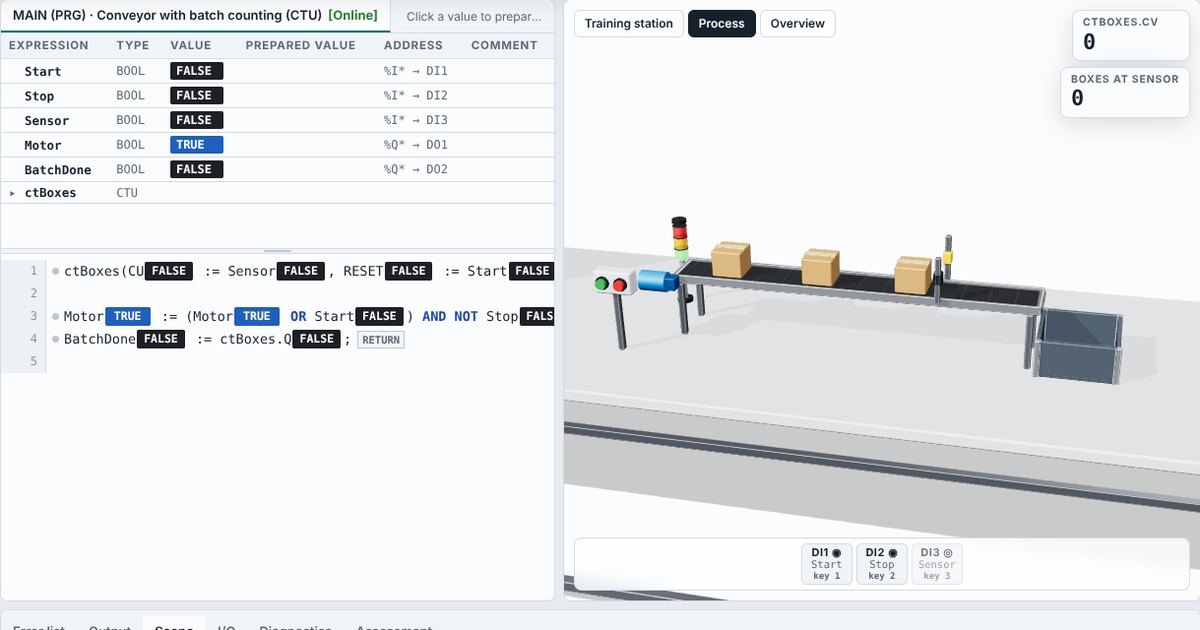
- Conveyor with batch counting (CTU) (Advanced) — A conveyor carries boxes to a bin. A photoelectric sensor at the end of the belt detects every box that passes
- Two-hand safety control (Advanced) — A press may only close when the operator uses both hands , so neither hand can be under the tool. Two-hand controls (EN ISO 13851) add a time rule: both buttons must be p…
- Star–delta motor starter (Advanced) — Large induction motors are started in star to limit the inrush current, then switched to delta for full power. Three contactors do the job: main (KM1), star (KM2) and del…
- Sliding gate with limit switches and photo-eye (Advanced) — An automatic sliding gate. One push button Button (DI1) operates it, two limit switches tell the PLC where the gate is, and a photo-eye watches the opening while the gate…
- Three-floor lift (Advanced) — A lift serves three floors. Each landing has a call button (DI1 … DI3) with a lamp that acknowledges the call (DO3 … DO5)

Frequently asked questions
Is there a free online PLC simulator for Structured Text?
Yes. The VisoTrain PLC lab runs in the browser and is included in the Free plan (two 30-minute sessions a day).
Which language does it use?
Structured Text (ST) as defined by IEC 61131-3: declarations with VAR … END_VAR, IF, CASE, FOR, WHILE, REPEAT, the standard timers, counters, edge and bistable blocks, and type conversions.
Does it behave like a real PLC?
Yes: inputs are read once per cycle, MAIN runs from top to bottom and the outputs are written at the end; run-time errors such as division by zero or an array index out of bounds stop the PLC, and a watchdog catches endless loops.
Is it tied to one manufacturer?
No. The lab follows the IEC 61131-3 standard and the workflow common to industrial PLC environments, without any manufacturer branding.